
Für zu Hause und die Schule
Die Komplettlösung für Ihre Dateien
Machen Sie Ihren Windows-PC mit einer einfachen App leistungsfähiger. Öffnen, bearbeiten, speichern und konvertieren Sie über 400 Dateitypen, ohne nach dem richtigen Programm suchen zu müssen.
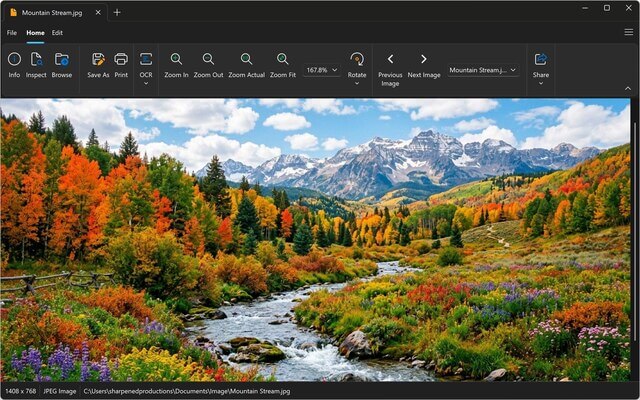
Ein Programm
Ersetzen Sie eine ganze Reihe von Apps durch eine einzige, die über 400 Dateiformate anzeigen und konvertieren kann.
Schnell und ressourcenschonend
Dateien – von Fotos und Videos bis hin zu langen Dokumenten – werden schnell geöffnet und laufen unter Windows 11 reibungslos.
Einfach zu bedienen
Ziehen Sie eine Datei per Drag-and-drop, um sie zu öffnen. Dokumente, Fotos und Videos werden im hellen oder dunklen Modus in Registerkarten geöffnet.
Vereinfachen Sie Ihren PC
Finden Sie alles auf Ihrem Computer, zeigen Sie eine Vorschau an und organisieren Sie Ihre Dateien im integrierten Dateimanager. Öffnen Sie jede Datei mit einem Doppelklick.
- Einen Ordner und alle seine Unterordner durchsuchen Neu in Version 7
- Vorschau jeder Seite von PDF- und Office-Dokumenten Neu in Version 7
- Identifizieren Sie unbekannte Dateien, auch solche ohne Dateierweiterung
- Werfen Sie einen Blick in ZIP- und RAR-Archive und extrahieren Sie nur die Dateien, die Sie benötigen
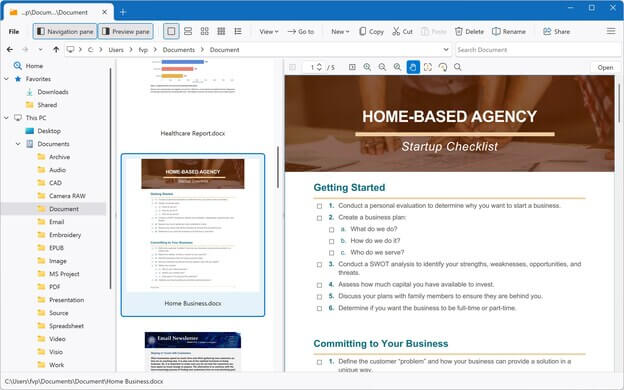
Ziehen, ablegen, fertig
Warum für mehrere Programme bezahlen, wenn Sie nur eines benötigen? File Viewer Plus öffnet die Dateien, die Sie aus der Schule, von der Arbeit und von Ihrer Familie erhalten, und konvertiert sie in die Formate, die Sie benötigen.
- Scannen Sie Hausaufgaben, Belege und Formulare und kopieren Sie den Text per OCR Neu in Version 7
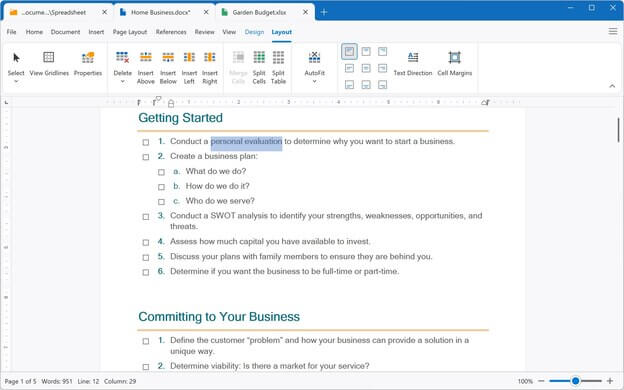
- Bearbeiten Sie Word-Dokumente und Excel-Tabellen
- Schneiden Sie Fotos zu, ändern Sie ihre Größe und bessern Sie sie nach
- Konvertieren Sie PDFs in Word sowie Fotos und Videos in andere Formate
Aktuelle Bewertungen
Weitere Bewertungen lesen →This is the best file viewer. It's easy to use and opens all kinds of files!
What a breeze. I downloaded another .XPS file viewer and converter program, and it was a bust, but File Viewer Plus worked like a charm!
File Viewer Plus is my go-to when I run into unexpected problems. It is an exceptional file viewer.
Wonderful software. File Viewer Plus is indispensable for every organisation, regardless of size, and it's an excellent tool for students as well. Since I started using it, all my conversions have been completely seamless.
This is the best thing to happen to my system, to the point that I have no clue how I used my computer without it! If you are still considering this app ... trust me, just get it.
File Viewer Plus is a fantastic, easy-to-use app, given the wide range of benefits it offers. The program has saved me more than once when looking for documents, pictures, presentations, and speeches. I would recommend it to anyone!
I have well over 300 Visio files and no longer have Visio access. I have been searching for a Visio file viewer, and this app worked smoothly on the first attempt!
File Viewer Plus has made it possible to view my embroidery files, which Windows won't do. I think it's a great program!
File Viewer Plus is quick and easy to use! It's especially helpful for opening my pictures in the proprietary Seattle Film Works format.
If you want to quickly check HEIC image files or batch convert them to JPG, I highly recommend downloading this program! The conversion results are excellent. Also, there are various preview options, so you can switch according to your preferences. It includes a simple, easy-to-understand interface design, a thoughtful design. Thank you to the developers for their dedication in providing such a high-quality app!
File Viewer Plus is excellent for teachers! I am a teacher, and students submit assignments using many different file types. This app really helps when I need to open unique file types, such as .HEIC files, that other apps can't open.
The app is simple and helpful. I've been looking for proper apps to open all my documents, as I don't have Office 365, and browsers don't help with editing them, but File Viewer Plus does it all!