
Für kleine Unternehmen
Für Unternehmen entwickelt
Schließen Sie sich Tausenden von Fachleuten an, die File Viewer Plus vertrauen, um Dateien in über 400 Formaten zu öffnen, zu bearbeiten, zu konvertieren und zu verwalten.
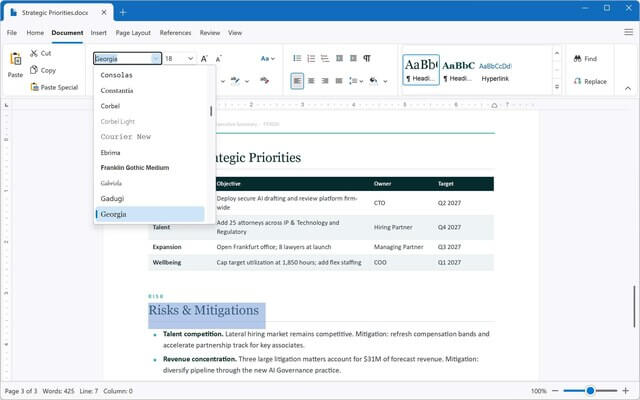
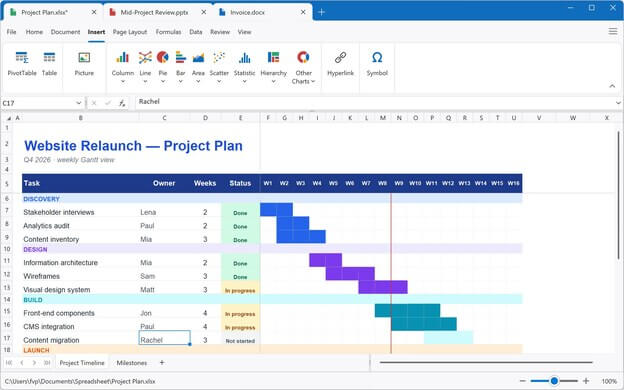
Unterstützung für Microsoft Office
Erstellen, bearbeiten, speichern und konvertieren Sie Word-Dokumente und Excel-Tabellen und zeigen Sie PowerPoint-Präsentationen an.
E-Mail-Anhänge
Öffnen Sie alles, was in Ihrem Posteingang landet – von Outlook-Nachrichten und Winmail.dat-Dateien bis hin zu Archiven und ungewöhnlichen Formaten.
Dateikonvertierung
Konvertieren Sie Dokumente, Bilder und Mediendateien in Dutzende von Formaten – einzeln oder Tausende auf einmal.
Optimieren Sie Ihren Arbeitsablauf
File Viewer Plus ist Ihre zentrale Lösung für Anhänge und Downloads. Öffnen und bearbeiten Sie sie und legen Sie sie anschließend im integrierten Dateimanager ab.
- WordPerfect-, OpenDocument- und Markdown-Dokumente öffnen Neu in Version 7
- E-Mails mit vollständiger Formatierung und allen Anhängen anzeigen Neu in Version 7
- Einen Ordner und alle seine Unterordner durchsuchen
- Dateien kopieren, verschieben, umbenennen und teilen, ohne die App zu verlassen
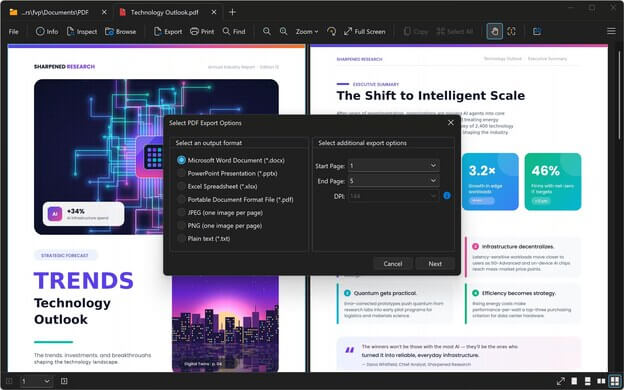
Sparen Sie Zeit
Benötigen Sie eine Datei in einem anderen Format? Wandeln Sie PDFs in bearbeitbare Word-Dokumente um oder konvertieren Sie mit der Stapelkonvertierung einen ganzen Ordner auf einmal.
Ein kostengünstiges Jahresabonnement umfasst jede neue Funktion. So bleibt Ihr Budget übersichtlich und Ihr Team verfügt immer über die neuesten Werkzeuge.
- Scannen Sie Papierdokumente und verwandeln Sie sie in durchsuchbare PDFs Neu in Version 7
- PDFs in Word, Excel und PowerPoint konvertieren
- Hunderte oder Tausende Dateien stapelweise konvertieren
Aktuelle Bewertungen
Weitere Bewertungen lesen →This is the best file viewer. It's easy to use and opens all kinds of files!
What a breeze. I downloaded another .XPS file viewer and converter program, and it was a bust, but File Viewer Plus worked like a charm!
File Viewer Plus is my go-to when I run into unexpected problems. It is an exceptional file viewer.
Wonderful software. File Viewer Plus is indispensable for every organisation, regardless of size, and it's an excellent tool for students as well. Since I started using it, all my conversions have been completely seamless.
This is the best thing to happen to my system, to the point that I have no clue how I used my computer without it! If you are still considering this app ... trust me, just get it.
File Viewer Plus is a fantastic, easy-to-use app, given the wide range of benefits it offers. The program has saved me more than once when looking for documents, pictures, presentations, and speeches. I would recommend it to anyone!
I have well over 300 Visio files and no longer have Visio access. I have been searching for a Visio file viewer, and this app worked smoothly on the first attempt!
File Viewer Plus has made it possible to view my embroidery files, which Windows won't do. I think it's a great program!
File Viewer Plus is quick and easy to use! It's especially helpful for opening my pictures in the proprietary Seattle Film Works format.
If you want to quickly check HEIC image files or batch convert them to JPG, I highly recommend downloading this program! The conversion results are excellent. Also, there are various preview options, so you can switch according to your preferences. It includes a simple, easy-to-understand interface design, a thoughtful design. Thank you to the developers for their dedication in providing such a high-quality app!
File Viewer Plus is excellent for teachers! I am a teacher, and students submit assignments using many different file types. This app really helps when I need to open unique file types, such as .HEIC files, that other apps can't open.
The app is simple and helpful. I've been looking for proper apps to open all my documents, as I don't have Office 365, and browsers don't help with editing them, but File Viewer Plus does it all!
File Viewer Plus Enterprise
Erhalten Sie eine unternehmensweite Lizenz, Mengenrabatte und eine unbeaufsichtigte MSI-Bereitstellung für Ihre gesamte Organisation.