Implementación mediante scripts
Para automatizar la instalación y la activación de la licencia en un solo paso, use uno de los scripts por lotes siguientes. Hay scripts disponibles tanto para Microsoft Marketplace como para las licencias basadas en claves.
Scripts de Microsoft Marketplace
Estos scripts instalan el software y activan la licencia usando la cuenta profesional o educativa de Microsoft con la sesión iniciada. El dispositivo debe estar unido a Entra ID o tener una cuenta profesional o educativa con la sesión iniciada, y el usuario debe tener asignada una licencia de File Viewer Plus Enterprise en el Centro de administración de Microsoft 365.
- fvp7-install-activate-marketplace.bat (EXE version)
- fvp7-install-activate-marketplace-msi.bat (MSI version)
Antes de ejecutar el script, edite los parámetros installer_path y install_dir:
:: NOTE: You must run this script with admin privilege in order for the installer to run silently without displaying a Windows UAC permissions prompt.
:: NOTE: You must set the variables below before executing the script:
SET installer_path=C:\Users\Public\fvp_setup_7.0.0.10ent.exe
SET install_dir=C:\Program Files (x86)\File Viewer Plus Enterprise
Scripts de clave de activación
- fvp7-install-activate-online.bat (EXE version)
- fvp7-install-activate-offline.bat (EXE version)
- fvp7-install-activate-online-msi.bat (MSI version)
- fvp7-install-activate-offline-msi.bat (MSI version)
Antes de ejecutar el script, edite los parámetros installer_path, install_dir, activation_key y enterprise_lic_path (enterprise_lic_path solo es necesario para la activación sin conexión):
:: NOTE: You must run these script with admin privilege for the installer to run silently without displaying a Windows UAC permissions prompt.
:: NOTE: You must set the variables below before executing the script:
SET installer_path=C:\Users\Public\fvp_setup_7.0.0.10ent.exe
SET install_dir=C:\Program Files (x86)\File Viewer Plus Enterprise
SET activation_key=XXXXX-XXXXX-XXXXX-XXXXX-XXXXX
SET enterprise_lic_path=C:\Users\Public\fvp7-enterprise.lic
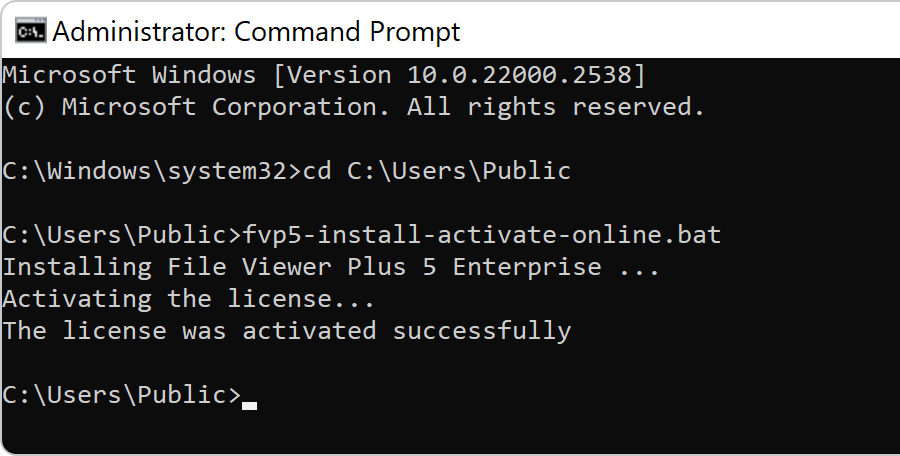
Si el script se ejecutó correctamente, verá el siguiente resultado:
Versions 5 and 6 (older versions)
Use the following scripts to deploy versions 5 and 6.
- fvp6-install-activate-marketplace.bat (versión EXE)
- fvp6-install-activate-marketplace-msi.bat (versión MSI)
- fvp6-install-activate-online.bat (versión EXE)
- fvp6-install-activate-offline.bat (versión EXE)
- fvp6-install-activate-online-msi.bat (versión MSI)
- fvp6-install-activate-offline-msi.bat (versión MSI)
- fvp5-install-activate-online.bat (versión EXE)
- fvp5-install-activate-offline.bat (versión EXE)
- fvp5-install-activate-online-msi.bat (versión MSI)
- fvp5-install-activate-offline-msi.bat (versión MSI)