Skriptbereitstellung
Um die Installation und Lizenzaktivierung in einem einzigen Schritt zu automatisieren, verwenden Sie eines der folgenden Batchskripte. Skripte sind sowohl für die Lizenzierung über Microsoft Marketplace als auch für die Lizenzierung mit Aktivierungsschlüssel verfügbar.
Microsoft Marketplace-Skripte
Diese Skripte installieren die Software und aktivieren die Lizenz über das angemeldete Microsoft-Arbeits- oder Schulkonto. Das Gerät muss in Entra ID eingebunden sein oder über ein angemeldetes Arbeits- oder Schulkonto verfügen. Außerdem muss dem Benutzer im Microsoft 365 Admin Center eine File Viewer Plus Enterprise-Lizenz zugewiesen sein.
- fvp7-install-activate-marketplace.bat (EXE version)
- fvp7-install-activate-marketplace-msi.bat (MSI version)
Bearbeiten Sie vor der Ausführung des Skripts die Parameter installer_path und install_dir:
:: NOTE: You must run this script with admin privilege in order for the installer to run silently without displaying a Windows UAC permissions prompt.
:: NOTE: You must set the variables below before executing the script:
SET installer_path=C:\Users\Public\fvp_setup_7.0.0.10ent.exe
SET install_dir=C:\Program Files (x86)\File Viewer Plus Enterprise
Skripte für Aktivierungsschlüssel
- fvp7-install-activate-online.bat (EXE version)
- fvp7-install-activate-offline.bat (EXE version)
- fvp7-install-activate-online-msi.bat (MSI version)
- fvp7-install-activate-offline-msi.bat (MSI version)
Bearbeiten Sie vor der Ausführung des Skripts die Parameter installer_path, install_dir, activation_key und enterprise_lic_path (enterprise_lic_path wird nur für die Offline-Aktivierung benötigt):
:: NOTE: You must run these script with admin privilege for the installer to run silently without displaying a Windows UAC permissions prompt.
:: NOTE: You must set the variables below before executing the script:
SET installer_path=C:\Users\Public\fvp_setup_7.0.0.10ent.exe
SET install_dir=C:\Program Files (x86)\File Viewer Plus Enterprise
SET activation_key=XXXXX-XXXXX-XXXXX-XXXXX-XXXXX
SET enterprise_lic_path=C:\Users\Public\fvp7-enterprise.lic
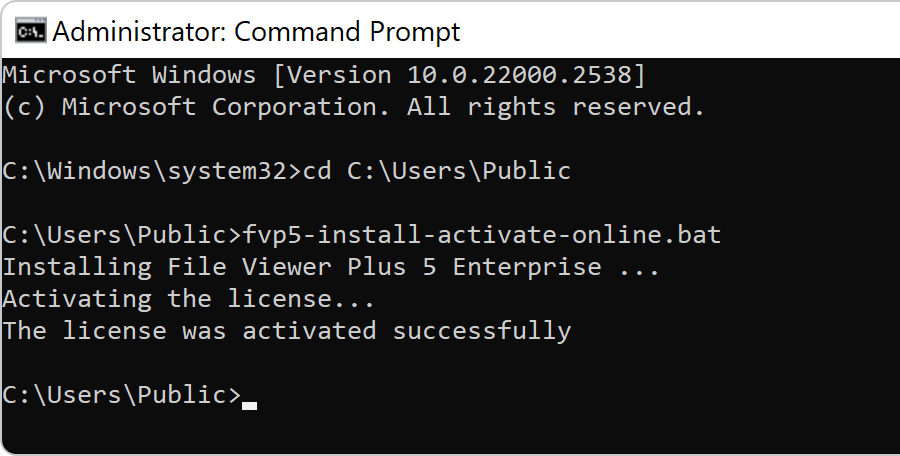
Wenn das Skript erfolgreich ausgeführt wurde, wird folgende Ausgabe angezeigt:
Versions 5 and 6 (older versions)
Use the following scripts to deploy versions 5 and 6.
- fvp6-install-activate-marketplace.bat (EXE-Version)
- fvp6-install-activate-marketplace-msi.bat (MSI-Version)
- fvp6-install-activate-online.bat (EXE-Version)
- fvp6-install-activate-offline.bat (EXE-Version)
- fvp6-install-activate-online-msi.bat (MSI-Version)
- fvp6-install-activate-offline-msi.bat (MSI-Version)
- fvp5-install-activate-online.bat (EXE-Version)
- fvp5-install-activate-offline.bat (EXE-Version)
- fvp5-install-activate-online-msi.bat (MSI-Version)
- fvp5-install-activate-offline-msi.bat (MSI-Version)