Open CPP files with File Viewer Plus
Do you need to open a CPP file?
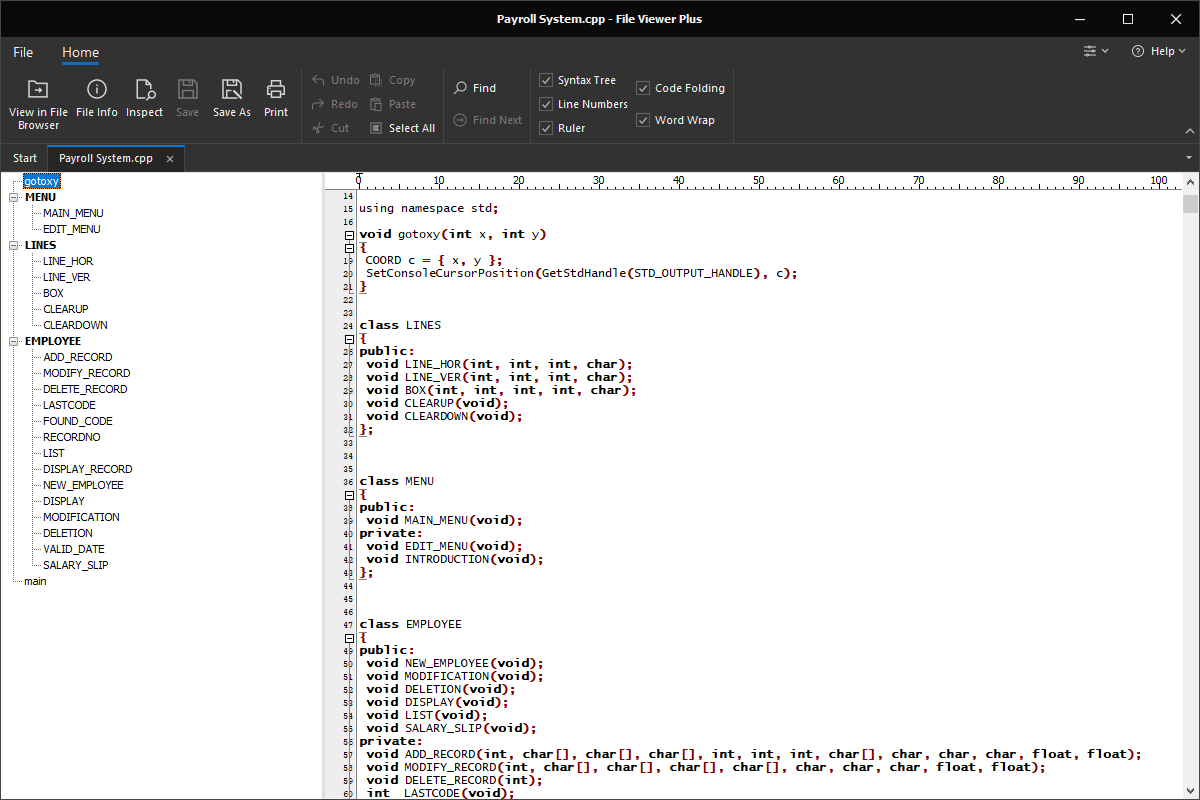
File Viewer Plus can open CPP (C++ Source Code) files, and it includes helpful viewing options, such as a syntax tree view for navigating the source code. The program can also edit the source code and save the CPP file.
Open, edit, and save CPP files with our easy-to-use source code editor. Try File Viewer Plus for free today!
What is a .CPP file?

CPP files are source code files that contain C++ code, which is a common programming language that is an extension of the C language. C++ is used to develop a variety of applications, including games, web browsers, and database software. A CPP file may include all of the code for a program or may be one of many source files referenced within a program project.
If you are a programmer, you most likely have worked with CPP files since C++ is used to develop many applications. File Viewer Plus can be used to open, edit, and save CPP files. The program also comes with various features to help you navigate and edit the source code, such as a syntax tree view, word wrap, code folding, ruler, and line numbers.
Alternate file extensions: .cxx
Learn more about CPP files at FileInfo.com →About File Viewer Plus
File Viewer Plus is the universal file viewer for Windows. Why pay for dozens of programs when you only need one? Install File Viewer Plus, and you'll be able to open over 400 file types with a single app.
You can also edit, save, print, and convert your files. Unknown file on your PC? No problem. The app's advanced file identification can recognize over 10,000 file formats, including files with incorrect or missing extensions.
See all supported file types →